


You have installed a cutting-edge Solid State Drive (SSD). The boot times are faster, and file transfers are snappier. But are you truly getting the 100% performance you paid for?
Expert Analysis from Qootec
With 15+ years in SSD and RAM manufacturing, our R&D team provides technical insights backed by real-world production data.
In the world of professional computing and enterprise servers, hardware is potential, but software is kinetic energy. Without the right firmware management and software optimization, even the fastest drive can suffer from latency spikes, reduced lifespan, and thermal throttling.
This guide explores the “invisible” side of storage performance—how to maintain the brain of your drive and the ecosystem around it.
1. The Brain of the Drive: Why Firmware Updates Matter
Inside every SSD is a controller—a specialized processor that manages where data is stored. This controller runs on Firmware, essentially the operating system of the drive itself.
Manufacturers frequently release firmware updates to:
-
Fix bugs that cause data corruption.
-
Improve the “Garbage Collection” algorithms (how the drive cleans up deleted data).
-
Optimize power consumption.
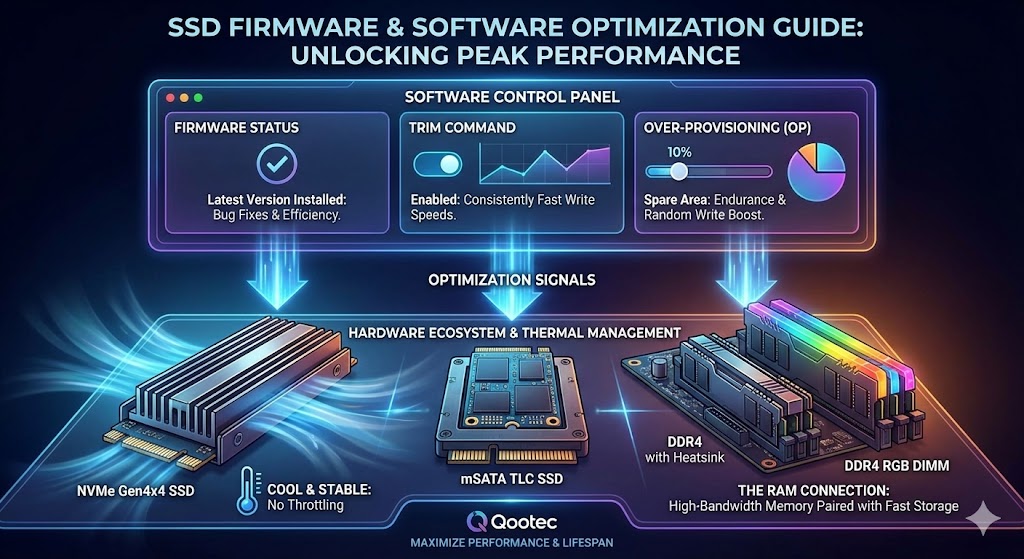
For High-Performance Drives: If you are running a blazing-fast NVMe Gen4x4 2280 SSD, keeping firmware updated is critical to handling the massive bandwidth (up to 7,000 MB/s) without errors.
For Industrial & Legacy Systems: Firmware isn’t just for the latest tech. In industrial applications using the compact mSATA TLC SSD, firmware updates often address compatibility stability with older embedded motherboards, ensuring your factory equipment keeps running smoothly.
2. OS Optimization: The Vital Role of TRIM
An SSD cannot simply overwrite existing data like a hard drive; it must erase the block first. This takes time.
The TRIM command allows your Operating System (Windows/Linux) to tell the SSD which data blocks are no longer in use, so the SSD can erase them internally during idle time.
-
The Result: Write speeds remain consistently fast over years of use.
-
The Check: Ensure TRIM is enabled in your OS. Without it, your drive will progressively slow down as it fills up.
Curious about how data blocks and NAND technology work? Read our deep dive into The Future of SSD Technology.
3. Eliminating Bottlenecks: Thermal and Memory Management
Optimization isn’t just about the drive; it’s about the environment it lives in.
Managing the Heat (Thermal Throttling)
Modern NVMe drives run hot. When an SSD overheats, it intentionally slows down to protect its components—this is called “Thermal Throttling.” To maintain peak performance, airflow is key. But heat doesn’t just affect storage; it affects memory too.
-
Solution: For high-load workstations, using DDR4 with Heatsink ensures that your system memory stays cool alongside your storage, preventing system-wide heat soak.
The RAM Connection
Your SSD feeds data to your RAM. If your RAM is slow or insufficient, your fast SSD is waiting at a red light.
-
For Gamers & Modders: Performance needs to match aesthetics. Pairing a fast NVMe with DDR4 RGB DIMM provides the high bandwidth needed for gaming while syncing with your rig’s lighting profile.
4. Strategic Over-Provisioning (OP)
Over-provisioning is a technique where a percentage of the SSD’s capacity (usually 7% to 28%) is set aside and made inaccessible to the user. The SSD controller uses this “spare area” to move data around efficiently.
-
Why do it? Increasing OP space can significantly extend the endurance (TBW) of the drive and improve random write performance.
-
The ROI: By tweaking software settings to extend hardware life, you maximize your investment. This is crucial given the fluctuations in the market—check our SSD Price Trends and Market Analysis to understand why preserving your current hardware is financially smart.
Conclusion: Maintenance is Performance
An SSD is not a “set it and forget it” component. Through regular firmware checks, enabling TRIM, and ensuring your supporting hardware (like RAM and cooling) is up to the task, you can maintain “Day 1” speeds for years.
Sometimes, however, software tweaks aren’t enough. If your drive is physically outdated or failing, no amount of optimization will save it. In that case, recognizing the signs is key—learn more in our guide: Upgrading Your System: When and Why to Switch to SSD?.
Technical review: Qootec R&D Department | Last updated: February 2026
Related Solutions
Looking for the right storage or memory solution? Explore our product lines:
- SSD Product Line — From consumer to industrial-grade
- DDR5 Memory — Next-gen performance
- DDR4 Memory — Proven reliability